AviationStack is where a lot of developers first meet flight data. The docs are clear, the signup is quick, and a free key gets you a response in a couple of minutes. The questions come later, usually when a prototype turns into a product: what does it cost at real volume, what does the free plan leave out, and is there something that fits better?
This post answers those with numbers. It covers AviationStack's current plans and what happens when you go over them, compares costs at six monthly volumes, lists the alternatives and what each is for, and ends with a practical guide to moving a flight status integration.
We sell one of those alternatives, so read the comparison with that in mind. We've tried to be exact about where AviationStack is the cheaper or better choice, because at some volumes and for some features it is. All AviationStack figures come from its pricing page and FAQ as of November 2026. Check them before you decide, because prices change.
AviationStack's plans
| Plan | Monthly | Billed yearly | Requests a month | Extra requests |
|---|---|---|---|---|
| Free | $0 | 100 | Not offered | |
| Basic | $49.99 | $44.99 | 10,000 | About $0.020 each |
| Professional | $149.99 | $131.99 | 50,000 | About $0.012 each |
| Business | $499.99 | $424.99 | 250,000 | About $0.008 each |
| Enterprise | Custom | Custom |
Three details matter more than the headline prices.
The free plan is for non-commercial use and has 100 requests a month. That's about three requests a day. It includes real-time flights and the reference data, but not historical flights, schedules, future flights, airline routes or autocomplete, which start on Basic.
Going over your allowance is billed, and the rate is high on Basic. AviationStack's FAQ says overage fees apply once you reach 100% of your quota. At about two cents a request, an extra 10,000 requests on Basic costs about $200, four times the plan itself. Past about 15,000 requests a month, the Professional plan is the cheaper one.
Requests that fail don't count. AviationStack says a request that returns an error isn't counted against your monthly volume. That's generous, and not every provider does the same: SkyLink counts every request that reaches the API, including ones that fail because of your input.
What you get
AviationStack's core is flight status and schedules: the flights endpoint returns a flight's status, its scheduled, estimated and actual times, terminals, gates and delays. Tracked flights also carry a live block with latitude, longitude, altitude and speed. AviationStack says status updates are delayed by as little as 30 to 60 seconds.
Paid plans add historical flights for the last three months, flight schedules, a future-flights lookup up to twelve months ahead, and airline routes. Reference endpoints cover airports, airlines, aircraft, aircraft types, cities, countries and aviation taxes.
What its documentation doesn't list is the operational side: there's no endpoint for METAR or TAF weather, NOTAMs, runway data or airport charts, and no way to ask "which aircraft are in this area right now". The documentation doesn't mention webhooks either, so anything that changes has to be polled.
Authentication is an access_key parameter in the URL. It's convenient, but it means your key appears in every request URL, and URLs end up in server logs, proxies and browser history. Keep those calls on your server.
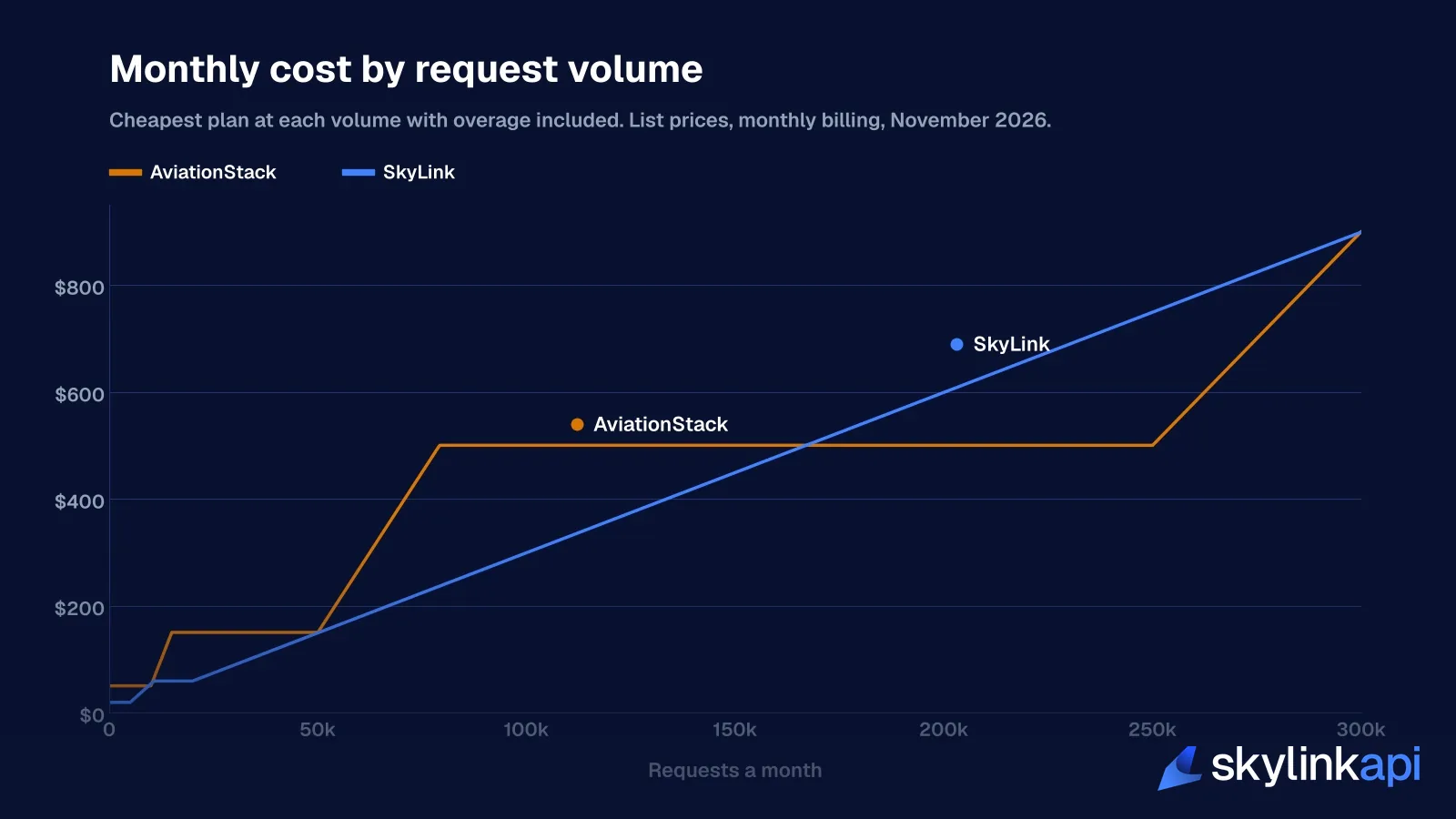
What it costs at six volumes
List prices, monthly billing, cheapest plan at each volume with overage included. SkyLink's plans are Basic at $19 for 5,000 requests and Pro at $59 for 20,000, with extra requests at $0.007 and $0.003.
| Requests a month | AviationStack | SkyLink |
|---|---|---|
| 3,000 | $49.99 (Basic) | $19 (Basic) |
| 5,000 | $49.99 (Basic) | $19 (Basic) |
| 10,000 | $49.99 (Basic) | $54 (Basic) |
| 20,000 | $149.99 (Professional) | $59 (Pro) |
| 50,000 | $149.99 (Professional) | $149 (Pro) |
| 100,000 | $499.99 (Business) | $299 (Pro) |
| 250,000 | $499.99 (Business) | $749 (Pro) |
Neither is cheaper everywhere:
- Below about 9,400 requests a month, SkyLink is cheaper. Its entry plan is $19 against $49.99.
- Between about 9,400 and 10,300, AviationStack is cheaper. That's the top of its Basic allowance, where you get the most for $49.99.
- From about 10,300 to 167,000, SkyLink is cheaper, by a wide margin around 20,000 and by about a dollar at 50,000, which sits exactly at the top of AviationStack's Professional allowance.
- From about 167,000 to 300,000, AviationStack's Business plan is cheaper than SkyLink Pro with overage. Those are list prices, though. For bigger volumes SkyLink's sales team is always available to negotiate the best deal, and enterprise contracts start at 200,000 requests a month, so ask for a quote before you compare.
The pattern is that a flat plan is best value at the top of its allowance and worst just past it. So the useful number is your own monthly volume. Here's the calculation, so you can run it yourself:
# (monthly price, included requests, price per extra request), list prices, November 2026
AVIATIONSTACK = {"Basic": (49.99, 10_000, 0.019996),
                 "Professional": (149.99, 50_000, 0.0119992),
                 "Business": (499.99, 250_000, 0.00799984)}
SKYLINK = {"Basic": (19, 5_000, 0.007),
           "Pro": (59, 20_000, 0.003)}

def cheapest(plans, requests_per_month):
    """Cheapest plan for a monthly volume, counting overage."""
    costs = {name: price + max(0, requests_per_month - included) * extra
             for name, (price, included, extra) in plans.items()}
    name = min(costs, key=costs.get)
    return name, round(costs[name], 2)

cheapest(AVIATIONSTACK, 20_000)   # ('Professional', 149.99)
cheapest(SKYLINK, 20_000)         # ('Pro', 59.0)
Yearly billing lowers both: AviationStack by up to 15%, SkyLink to $16 and $49 a month.
Price per request is only half of it, though. What a request returns matters as much. A departure board is one request on either service, but a product that also needs weather, NOTAMs or aircraft positions needs a second supplier alongside AviationStack, with its own bill.
The alternatives, and what each is for
SkyLink API. Flight status and schedules, plus live ADS-B positions you can query by area, decoded METAR and TAF, NOTAMs, airports with runways and frequencies, chart links, and flight history on Pro. It has official Python and TypeScript SDKs, webhooks on Pro, and an MCP server for AI agents. It's the closest fit when you'd otherwise combine AviationStack with a weather or NOTAM source. The AviationStack vs SkyLink comparison sets the two side by side.
FlightAware AeroAPI. Per-query pricing, strong operational data and predicted arrival times. Cheap at low volume, expensive when you poll, and good when you use its alerts. Our AeroAPI pricing breakdown works through the costs.
Flightradar24 API. Flightradar24's own tracking data on its own terms, priced in credits. Flightradar24 API alternatives covers when it fits.
AirLabs. Live positions alongside airline, airport and route databases, with a free tier. No aviation weather or NOTAMs. See AirLabs vs SkyLink.
AeroDataBox. A low-cost option for flight, aircraft and airport lookups, aimed at small teams and students. See AeroDataBox vs SkyLink.
OpenSky Network. Free ADS-B data for research and non-commercial use. It has positions only, with no schedules or status. OpenSky vs commercial APIs explains the limits.
For a wider survey, aviation data APIs compared covers seven providers.
When to stay with AviationStack
Switching has a cost, so it's worth being clear about when not to.
- You need future schedules. AviationStack's future-flights lookup reaches twelve months ahead. SkyLink's schedules cover five days back to one day ahead, so it can't answer "what flies this route next June".
- You need past flights by date on a small budget. AviationStack includes three months of historical flights from its $49.99 plan. SkyLink's flight history is built from ADS-B tracks and starts on Pro at $59.
- You use autocomplete, cities or tax data. SkyLink has no equivalent for the cities and taxes endpoints.
- Your volume sits near the top of a plan. At 10,000 or 250,000 requests a month, AviationStack's list price is lower.
- It works and it's all you need. An integration that does its job is worth more than a saving of a few dollars.
Migrating a flight status integration
If you do move, most of the work is in three differences.
Authentication moves to a header. AviationStack takes access_key in the URL. SkyLink takes an x-api-key header and never reads the key from the URL.
One flight per request, by path. AviationStack filters a list with flight_iata=BA117. SkyLink has a dedicated endpoint, /flight_status/BA117, that returns one flight for today, or a 404 when it isn't operating.
Times are local board times. AviationStack returns full timestamps and a ready-made delay in minutes. SkyLink returns the local time and date as an airport board shows them, such as 08:25 and 24 Nov, and leaves the delay to you. Unpublished gates and belts are empty strings where AviationStack sends null.
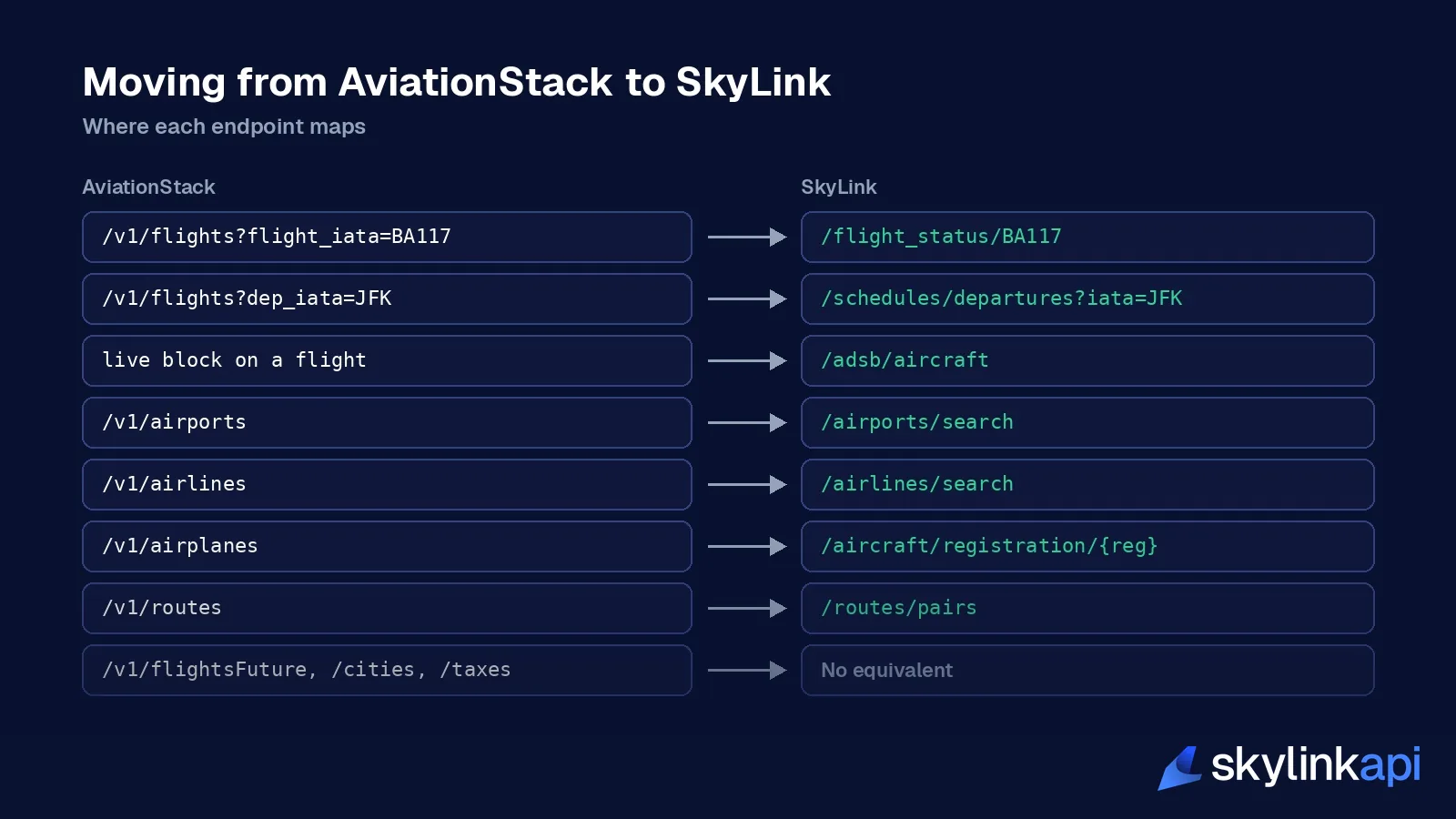
Here's where the endpoints map:
| AviationStack | SkyLink |
|---|---|
/v1/flights?flight_iata=BA117 | /flight_status/BA117 |
/v1/flights?dep_iata=JFK | /schedules/departures?iata=JFK |
The live block on a flight | /adsb/aircraft by callsign, or by area |
/v1/airports | /airports/search |
/v1/airlines | /airlines/search |
/v1/airplanes | /aircraft/registration/{reg} |
/v1/routes | /routes/pairs and /routes/airport/{code} |
/v1/countries | /countries |
/v1/flightsFuture, /v1/cities, /v1/taxes | No equivalent |
An adapter makes the move gradual. This one fetches a SkyLink flight status and returns the fields an AviationStack integration usually reads, under the names it expects, so the rest of your code doesn't change on day one:
import re
import requests
from datetime import datetime

BASE = "https://data.skylinkapi.com/v3.1"

def _when(date_label, time_label, year):
    if not date_label or not time_label:
        return None
    try:
        return datetime.strptime(f"{date_label} {year} {time_label}", "%d %b %Y %H:%M")
    except ValueError:
        return None

def _delay(leg, latest, year):
    sched = _when(leg.get("scheduled_date"), leg.get("scheduled_time"), year)
    other = _when(leg.get(f"{latest}_date"), leg.get(f"{latest}_time"), year)
    if not sched or not other:
        return None
    mins = (other - sched).total_seconds() / 60
    if mins < -12 * 60:                    # scheduled 31 Dec, departed 1 Jan
        mins += 365 * 24 * 60
    return round(mins)

def flight_like_aviationstack(flight_iata, year=None):
    """Fetch a SkyLink flight status and return the fields an AviationStack
    integration usually reads, under the names it expects."""
    number = re.sub(r"\s+", "", flight_iata).upper()
    r = requests.get(f"{BASE}/flight_status/{number}", headers={"x-api-key": KEY}, timeout=15)
    if r.status_code == 404:
        return None                        # AviationStack returns an empty data list here
    r.raise_for_status()
    s = r.json()
    year = year or datetime.now().year
    dep, arr = s["departure"], s["arrival"]
    return {
        "flight_status": s["status"],      # free text, not AviationStack's fixed values
        "airline": {"name": s["airline"]},
        "flight": {"iata": number},
        "departure": {
            "airport": dep["airport_full"],
            "terminal": dep["terminal"] or None,     # SkyLink sends "" when unknown
            "gate": dep["gate"] or None,
            "delay": _delay(dep, "actual", year),
            "scheduled_local": f'{dep["scheduled_date"]} {dep["scheduled_time"]}',
        },
        "arrival": {
            "airport": arr["airport_full"],
            "terminal": arr["terminal"] or None,
            "gate": arr["gate"] or None,
            "baggage": arr["baggage"] or None,
            "delay": _delay(arr, "estimated", year),
            "scheduled_local": f'{arr["scheduled_date"]} {arr["scheduled_time"]}',
        },
    }
Two things the adapter can't hide. flight_status is free text such as "En Route" or "Landed", so code that compares against AviationStack's fixed values, such as scheduled, active, landed and cancelled, needs a loose match instead. And the scheduled times are local to each airport with no time zone attached, so anything that did arithmetic on AviationStack's timestamps needs the airport's time zone from the airport record.
Run both in parallel for a week before you cut over, and compare a sample of flights. The flight status API guide covers the SkyLink response in detail.
How to decide
- Count your requests. Per user action, per refresh, per month. Put the number into the calculator above.
- List the data you need in a year, not just today. If weather, NOTAMs or a live map are on the roadmap, a second supplier is too.
- Check the licence. AviationStack's free plan is non-commercial, and so is SkyLink's Free Trial. A product needs a paid plan on either.
- Test with your own flights. Coverage and freshness vary by region and airline. Pick twenty flights you care about and compare.
SkyLink's plans are on the pricing page, and a paid plan's key is issued at checkout. If you need more than the plans cover, contact sales: the team is always available to negotiate the best deal for larger volumes. The Free Trial is available by application, for personal non-commercial use.